Biodata format for a job: a simple example and outline
Many employers, banks and government offices in India still ask for a “biodata” instead of a resume: a one-page summary of your qualifications with a short block of personal details at the top. Below are the difference from a resume, the sections in order, a full example and an outline to copy.
This page is about a biodata for a job. A marriage biodata has different sections (family, horoscope, expectations) and is not covered here.
Biodata, resume or CV: what is the difference?
Biodata is short for “biographical data”. A job biodata lists your personal details first (name, date of birth, nationality, languages and address), then a career objective, education, experience, skills and a declaration with your signature. Government jobs, banks, schools and many family-run companies still use it.
A resume is one or two pages focused on your skills, experience and results for one kind of job. It usually leaves out date of birth, nationality and the declaration. Private companies and job portals expect a resume.
A CV in India usually means the same as a resume. In academic jobs it can mean a longer record with publications and research. For a full comparison of layouts, read the resume format guide.
Follow the employer’s word: if the ad says “biodata”, use this format; if it says resume or CV, drop the personal details and the declaration.
Biodata sections in order
Name and the post you are applying for
Your full name in large type, and below it the position, such as “Accounts Assistant” or “Bank Clerk”.
Personal details
Date of birth, nationality, languages known, and your phone, email and address. Gender, father’s name and marital status only if the form asks for them.
Career objective
Two or three lines: your qualification, the role you want and your two strongest skills.
Educational qualifications
Degree, college or university, year and percentage or CGPA, then class XII and class X with board, year and marks.
Work experience or internships
Employer, post, dates and two or three lines on what you did. Freshers can list internships, training and projects here.
Skills and certificates
Computer skills (Tally, Excel, typing speed), certificates such as CCC, and any job-related training.
Declaration and signature
“I hereby declare that the above information is true to the best of my knowledge,” followed by place, date and your signature.
Biodata example for a job
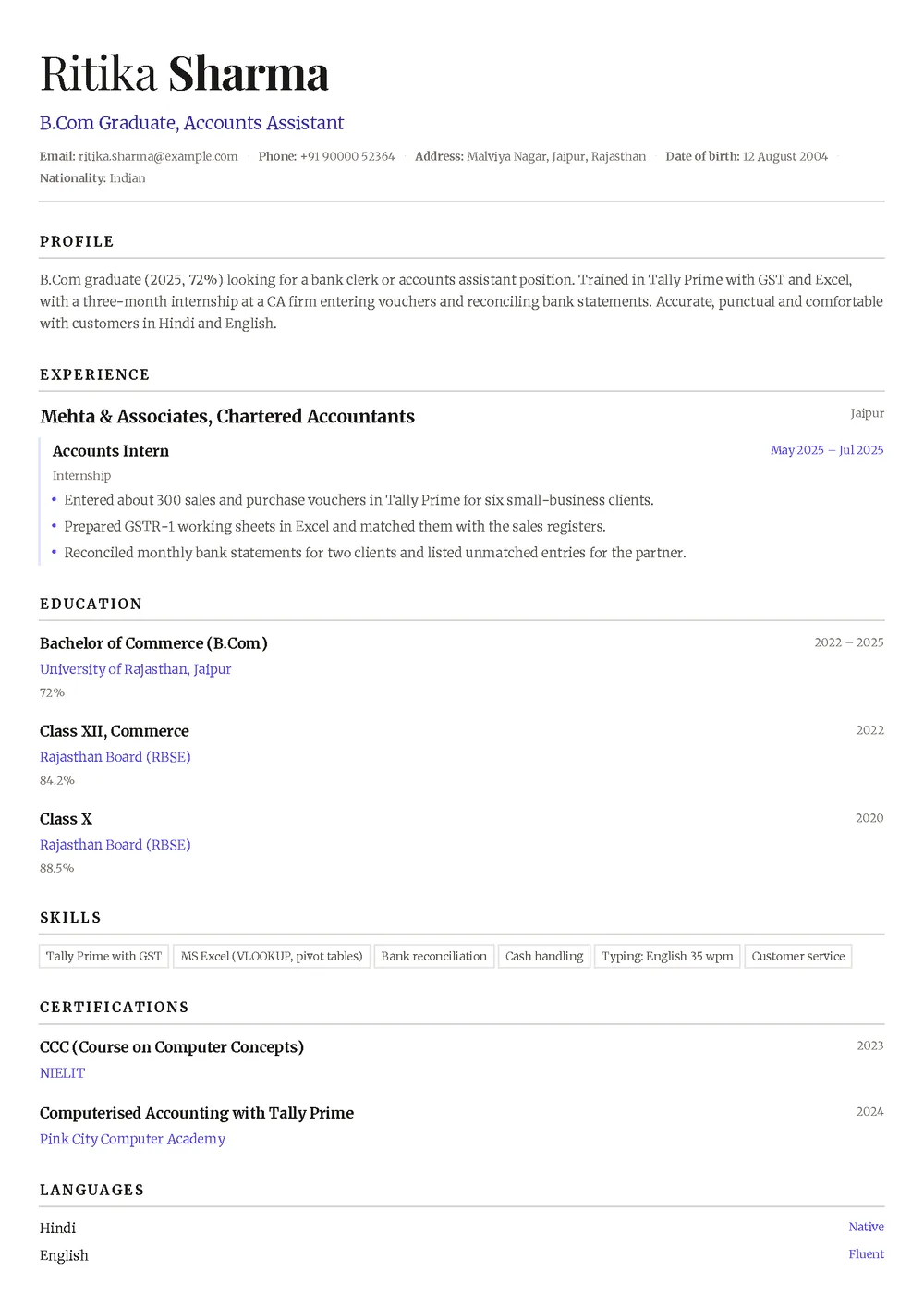
Ritika is a 2025 B.Com graduate from Jaipur applying for bank clerk and accounts assistant posts. Her biodata is designed in the Quill template in indigo: one column, with date of birth and nationality on the contact line under her name.
Date of birth: 12 August 2004 · Nationality: Indian · Languages: Hindi (native), English (fluent)
Career objective
B.Com graduate (2025, 72%) looking for a bank clerk or accounts assistant position. Trained in Tally Prime with GST and Excel, with a three-month internship at a CA firm entering vouchers and reconciling bank statements. Accurate, punctual and comfortable with customers in Hindi and English.
The person, college, firm and academy in this example are fictional. The designed version leaves out the declaration: Noga CV has no declaration section, so add that line by hand if an employer asks for it.
Biodata format for job: outline to copy
Fill in this order on one A4 page.
1. Name and post applied for
Full name; below it, the exact post from the job advertisement.
2. Personal details
Date of birth (DD Month YYYY), nationality, languages known, mobile number, email and correspondence address with PIN code.
3. Career objective
Two or three lines naming the post, your qualification and what you bring.
4. Educational qualifications
Highest degree first: course, college or university, year, percentage. Then class XII and X with board and marks.
5. Work experience
Latest job first: post, employer, place, dates, two or three duties or results. Freshers: internships, apprenticeship or training.
6. Skills and certificates
Computer skills, typing speed, software, and certificates that match the post.
7. Declaration
One line, then place, date and signature at the bottom right.
Just finished college and applying to private companies? The resume for freshers guide has a full B.Tech example and a simple resume format.
6 biodata mistakes to avoid
Too many personal details
Height, weight, religion, caste and hobbies are rarely needed for a job. Add them only if the form asks.
Copying a marriage biodata
Family background, horoscope and expectations belong in a marriage biodata, not in one you send to an employer.
No post name
HR often fills several vacancies at once. Write the post under your name.
Marks missing or inconsistent
Use percentage or CGPA the same way for every row, with the year, and check them against your mark sheets.
A handwritten or photographed biodata
A scan or phone photo is hard to read. Type it and send a PDF.
Forgetting the date and signature
If you include a declaration, add the place and date, and sign the printed copy you carry to the interview.
Questions
Is biodata the same as a resume?
Not quite. A job biodata adds a personal-details block (date of birth, nationality, languages, address) and a declaration to what a resume has. Many Indian employers use both words for the same one-page document.
Should I add a photo to my biodata?
It is optional in India. Add a recent passport-size photo only if the employer or the form asks for one. Private companies and job portals do not need it.
Should I write my date of birth in a biodata?
Yes, in a job biodata. Government jobs and banks often check age limits. In a resume for a private company you can leave it out.
Should a biodata be one page?
Yes, for freshers and anyone with a few years of experience. Use two pages only if you have many years of relevant work.
Should I send my biodata as a PDF or Word file?
Send a PDF unless the employer asks for Word; it looks the same on every phone and computer. Name it Ritika-Sharma-Biodata.pdf, for example, and carry a printed copy to walk-in interviews.
Noga CV is a free resume builder for Android. Pick one of 34 templates, fill in your details, education and experience, ask AI for suggestions and download an A4 PDF. AI suggestions and downloads are free with ads. No account needed, and the app interface is in English.
 Noga CV